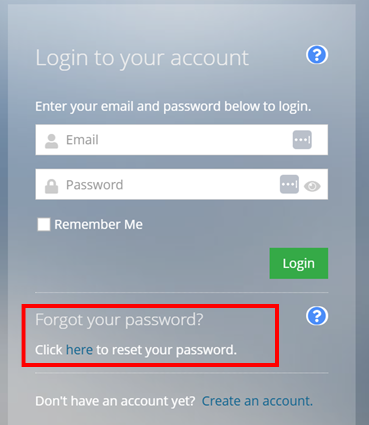
A dialog box will appear. Select ‘Click here to reset your password’.
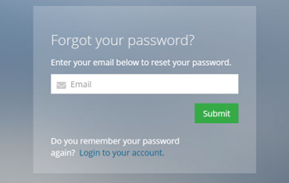
Step 2. Enter your email address. This will send a link to create a new password.
If you have any questions or need immediate assistance with creating an account, please contact us at [email protected] or give us a call at +1 (913) 222-8659.
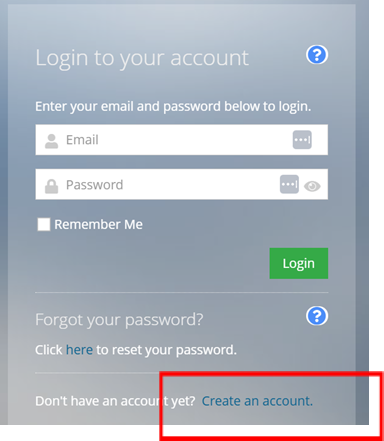
A dialog box will appear. Select ‘Create an account’.
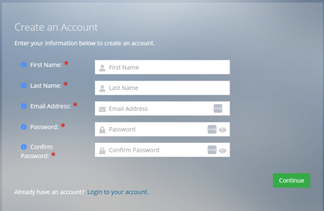
Step 2. On the Create an Account page, enter your information. If an account already exists with your email, the system will notify you, please revisit Step 1 for existing users to reset your password.
Create a new password with a minimum of 16 characters, including at least one uppercase letter, one numeric character, and one non-alphanumeric character. Then select “Continue.”
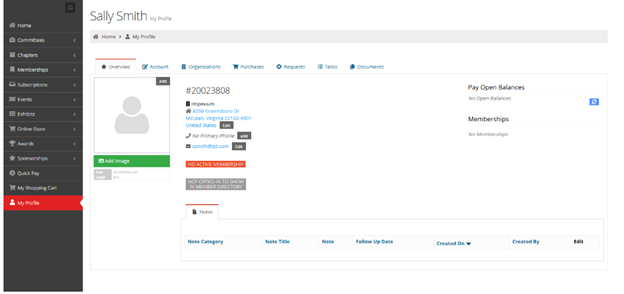
Step 3. You are now on your profile page. From this page you can update your information or navigate to other areas to purchase memberships, register for events, or access materials. Please be sure you click on “Account” and update your demographic information – scrolling all the way to the bottom and selecting the committees you wish to be part of.
If you have any questions or need immediate assistance with creating an account, please contact us at [email protected] or give us a call at +1 (913) 222-8659.
The SOMA office will be closed for the holidays:
Monday, December 23, 2024 – Wednesday, January 1, 2025
Please email us at [email protected] and we will get back to you as soon as possible.